Let's start.
First of all, I've cloned one machine (here are the steps: 1, 2 and 3) where there was installed just the software of Oracle Database 10gR2 (10.2.0.1.0). Then I modified the /etc/sysctl.conf file to use the 11g settings provided by Oracle validated rpm package.

Load the new settings with the command:
[root@vsi08devpom ~]# /sbin/sysctl -p
net.ipv4.ip_forward = 0
net.ipv4.conf.default.rp_filter = 2
net.ipv4.conf.default.accept_source_route = 0
kernel.core_uses_pid = 1
net.ipv4.tcp_syncookies = 1
fs.file-max = 6815744
kernel.msgmni = 2878
kernel.msgmax = 8192
kernel.msgmnb = 65536
kernel.sem = 250 32000 100 142
kernel.shmmni = 4096
kernel.shmall = 1073741824
kernel.shmmax = 4398046511104
kernel.sysrq = 1
net.core.rmem_default = 262144
net.core.rmem_max = 4194304
net.core.wmem_default = 262144
net.core.wmem_max = 1048576
fs.aio-max-nr = 3145728
net.ipv4.ip_local_port_range = 9000 65500
vm.min_free_kbytes = 51200

Next verify your limit settings according to Oracle documentation:
cat /etc/security/limits.conf

# Oracle-Validated setting for nofile soft limit is 131072
oracle   soft   nofile    131072

# Oracle-Validated setting for nofile hard limit is 131072
oracle   hard   nofile    131072

# Oracle-Validated setting for nproc soft limit is 131072
oracle   soft   nproc    131072

# Oracle-Validated setting for nproc hard limit is 131072
oracle   hard   nproc    131072

# Oracle-Validated setting for core soft limit is unlimited
oracle   soft   core    unlimited

# Oracle-Validated setting for core hard limit is unlimited
oracle   hard   core    unlimited

# Oracle-Validated setting for memlock soft limit is 50000000
oracle   soft   memlock    50000000

# Oracle-Validated setting for memlock hard limit is 50000000
oracle   hard   memlock    50000000

I didn't modify the following settings coming from the previous Oracle Database 10gR2 software installation.


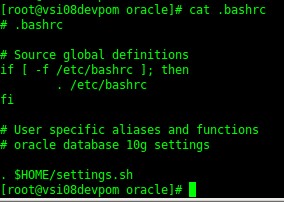
I modified the ORACLE_SID and the ORACLE_HOME in /home/oracle/settings.sh file

Now I have to create the software installation path for Oracle Database 11gR2.
[root@vsi08devpom ~]# cd /opt/app/oracle/product

[root@vsi08devpom product]# ll
total 4
drwxrwx--- 3 oracle oinstall 4096 Feb 27 14:20 10.2.0

[root@vsi08devpom product]# mkdir -p 11.2.0/db_1

[root@vsi08devpom product]# ll
total 8
drwxrwx--- 3 oracle oinstall 4096 Feb 27 14:20 10.2.0
drwxr-xr-x 3 root   root     4096 Jun  6 14:41 11.2.0

[root@vsi08devpom product]# chown -R oracle.oinstall 11.2.0/

[root@vsi08devpom product]# chmod -R 755 11.2.0/

[root@vsi08devpom product]# ll
total 8
drwxrwx--- 3 oracle oinstall 4096 Feb 27 14:20 10.2.0
drwxr-xr-x 3 oracle oinstall 4096 Jun  6 14:41 11.2.0

Download the 11gR2 database software, extract it and as oracle user execute the runInstaller as usual.

